Agent runs.
A run gives an agent a task inside one of your workspaces and lets it work on its own. You write what you want done, pick the agent (Pi, Pi + Gentle Shell or Hermes, among the ones installed in that workspace) and the folder, and the run takes it from there. It keeps going if you close the page or the terminal.
While it works you follow its log live. When it ends you get its result and, if the folder is a git repository, a branch with its changes, ready for you to review.
You can start a run in three ways, and all three see the same runs:
- From the Runs tab of your workspace in the portal.
- From your terminal, with
nan run. - From your own scripts, with the API.
To run the same task again and again, from a webhook, on a schedule or with actions that wait for your approval, save it as an automation.
Before you start
- A workspace that is running, with at least one agent installed: Pi, Pi + Gentle Shell or Hermes. You install them from the Software panel of the workspace. See Pick the agent.
- A plan with inference, or your own provider key. With NaN inference (the default), a run uses your workspace’s own inference key, and what the agent spends counts against your plan’s usage like any other request. With your own provider key, your provider bills it and a plan with inference is not needed: an active workspace of your own is enough.
Pick the agent
A run can use one of three agents. Each one needs its programs installed in the workspace:
| Agent | Value for --agent and agent | What the workspace needs |
|---|---|---|
| Pi | pi | Pi. |
| Pi + Gentle Shell | pi_gentle | Pi and gentle-shell. The run starts Pi through gentle-shell, so the agent works with gentle-shell’s subagents, guardrails and memory. |
| Hermes | hermes | Hermes, picked when you created the workspace or installed from the Software panel. |
Runs and automations only accept an agent the workspace has installed:
- In the portal, the Agent list of a new run or an automation shows only the agents of that workspace. If it has none, the portal says so and links to its Software panel: install one there first.
- From the CLI or the API, asking for an agent the workspace does not have is refused before the run is created, with
409 agent_not_installed(the error names theagentfield).nan runexits with code 4. Install the agent from the Software panel, or pick another one, and try again. - An automation keeps its agent if you remove that agent from the workspace later (the editor marks it (not installed)), but its runs are refused until you install it again or pick another agent. If you change an automation’s workspace and the new one lacks its agent, the editor switches to one it has and tells you.
To know from a script which agents a workspace can run, read its run_agents field: see API reference → Workspaces.
Start a run from the portal
Open the Runs tab
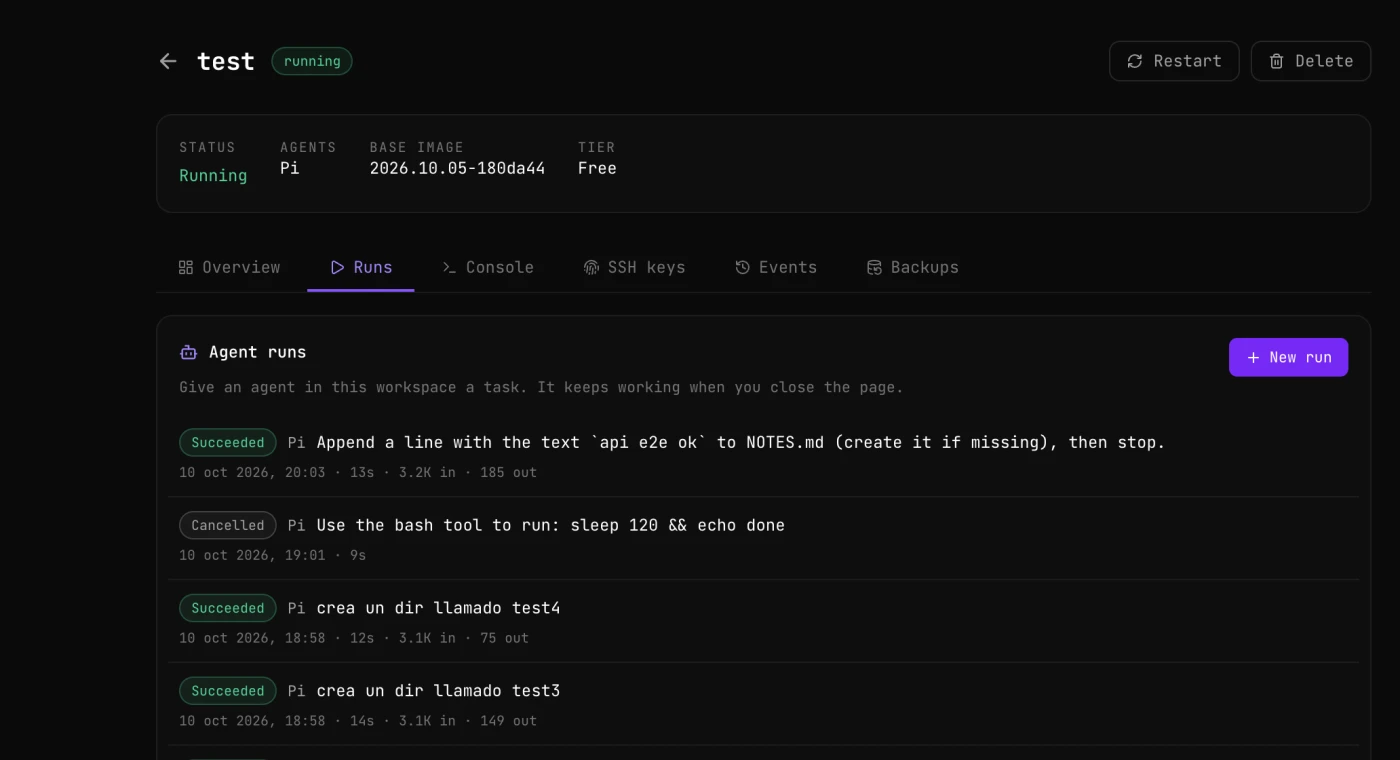
Go to cloud.nan.builders/workspaces and open a workspace. Next to Overview, Console, SSH keys, Events and Backups there is a Runs tab. Its Agent runs card lists the runs of that workspace, newest first, each with its state, the agent, the task, when it started, how long it took and the tokens it used.
Fill in the form
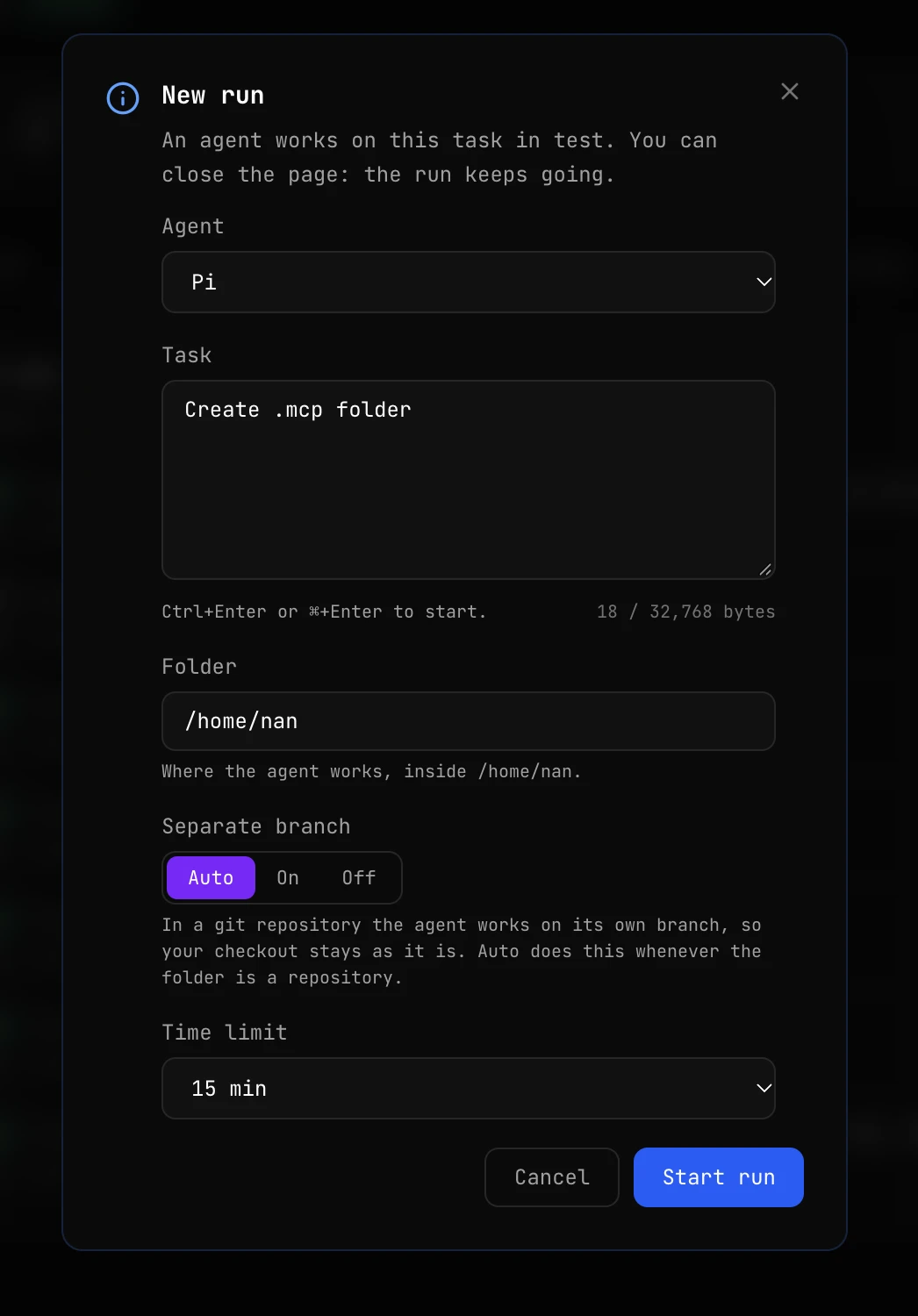
Press New run and fill in the form:
| Field | What it is |
|---|---|
| Agent | Pi, Pi + Gentle Shell or Hermes. The list shows only the agents installed in the workspace. See Pick the agent. |
| Task | What you want done, in your own words, as you would write it to the agent in a chat. Up to 32 KiB (the counter under the box shows the bytes used). |
| Folder | Where the agent works. It defaults to /home/nan and must be inside it. |
| Separate branch | Auto (the default), On or Off. In a git repository, the agent works on its own branch and your checkout stays as it is. See Where the agent works. |
| Time limit | 30 min by default, the same as the CLI and the API. The options are 15 min, 30 min, 1 hour and 2 hours. The run is stopped when it reaches it. |
| Inference | NaN (included in your plan), the default (shown as NaN (not in your plan) when your plan has no inference), or My own key: a Provider key of yours and the Model to use. See Use your own provider key. |
Press Start run, or Ctrl+Enter (⌘+Enter on a Mac) from the task box.
Follow it live
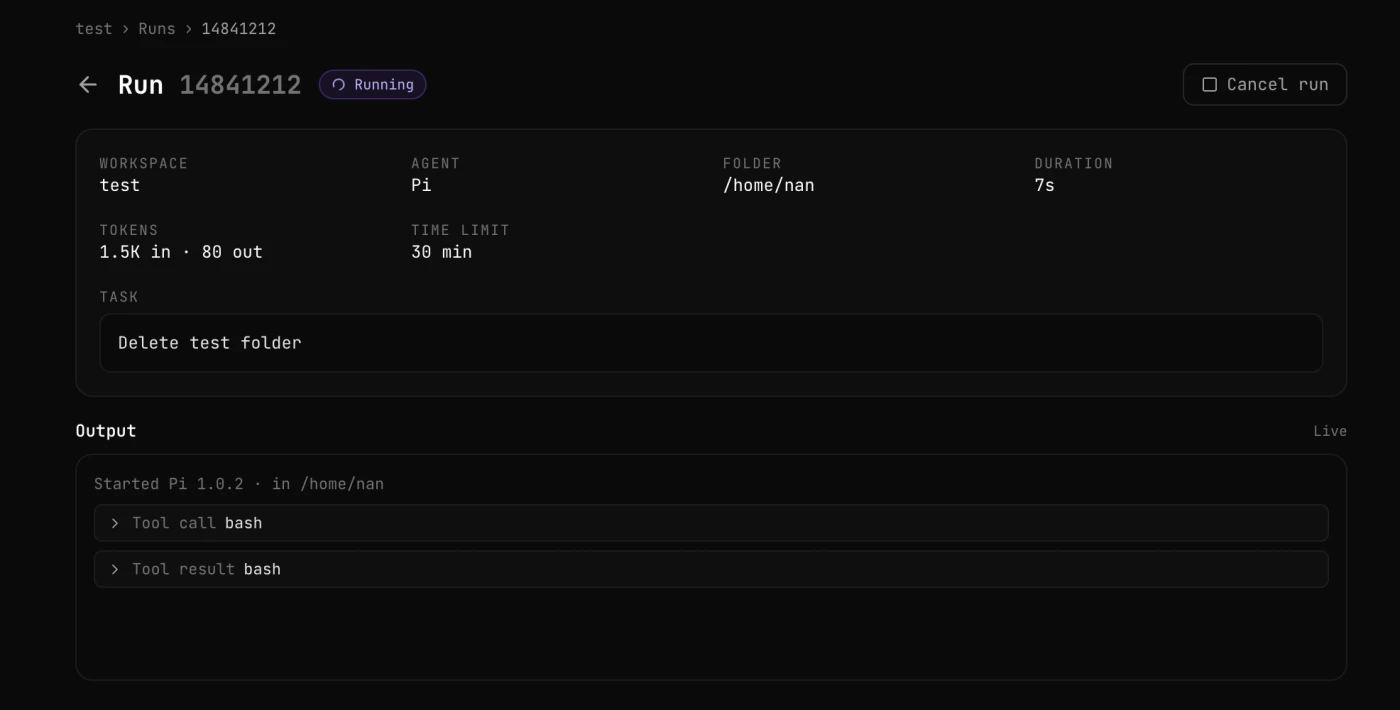
Click a run in the list to open its page. At the top you see its state, the workspace, the agent, the folder, how long it has been running, the tokens it has used, its time limit and the task. Below, under Output, the log fills in live as the agent works: what it says, the tools it calls and what they answer. Click a Tool call or Tool result line to unfold it. When the run ends, the page shows how it ended, the agent’s summary and, if there is one, the branch with its changes.
You can close the page at any moment. The run goes on, and its page is there when you come back.
Cancel it, if you need to
Cancel run stops the run within a few seconds. The portal asks you to confirm first.
Where the agent works
What happens to your files depends on the Folder you choose and on the Separate branch setting.
| The folder is… | Auto (default) | On | Off |
|---|---|---|---|
| inside a git repository | Separate branch | Separate branch | Directly in the folder |
| not a git repository | Directly in the folder | The run fails with a configuration error | Directly in the folder |
With a separate branch, the agent does not touch your checkout. It works in a separate copy of the repository (a git worktree), on a new branch called nan-run/ followed by the first 8 characters of the run id, for example nan-run/6f1c2a9b. When the agent ends, whatever it changed is committed on that branch. The run never pushes: the branch stays in the repository inside your workspace, and you decide what to do with it. If the agent changed nothing, the branch is deleted.
To review the changes and bring them in, open a terminal in your workspace (over SSH or the Console tab) and, from the repository:
git log -p HEAD..nan-run/6f1c2a9b
git merge nan-run/6f1c2a9b
Without a separate branch, the agent works directly in the folder and there is no branch. Use it for folders that are not repositories, or when you want the changes right there.
The folder must be inside /home/nan, your home in the workspace.
Run states
| State | What it means |
|---|---|
queued | Waiting for a free place. See How many runs at once. |
starting | Being set up in the workspace. |
running | The agent is working. |
succeeded | The agent finished its task. |
failed | The agent stopped with an error, or the run could not start (for example, Separate branch set to On in a folder that is not a repository). |
cancelled | You cancelled it. |
timed_out | It reached its time limit and was stopped. |
awaiting_approval | Only for automation runs: the agent finished and proposed actions that wait for your approval. |
The portal shows the same states with a capital letter, for example Running, Succeeded or Cancelled.
Through the CLI and the API the time limit goes from 60 seconds to 2 hours. The portal offers 15 min, 30 min, 1 hour and 2 hours, with 30 min by default.
How many runs at once
How many runs work at the same time depends on the size of the workspace:
| Size | Runs at once |
|---|---|
| Micro (also the free Premium workspace) | 1 |
| Nano | 2 |
| Basic | 3 |
| Medium | 5 |
| Large | 8 |
On top of that, runs on NaN inference share your inference concurrency, so you can have at most 5 of them working at once across all your workspaces (8 on Premium). Runs on your own provider key have their own limit: up to 8 at once across all your workspaces.
Runs beyond those limits are not refused: they wait in a queue and start in order, first in, first out. The queue holds up to 20 runs per workspace and 50 in total, and you can create up to 60 runs per hour.
Each run works in its own process inside the workspace, with its own share of CPU and memory. If one gets out of hand, it is stopped alone: your SSH sessions and your always-on agents keep working.
Inference and secrets
Runs on NaN inference use the inference key of the workspace, the same one its agents use when you work with them by hand. Their requests count against your plan’s usage like any other. Runs on your own provider key use your key instead, and never get the workspace’s.
Secrets in your workspace’s environment file, such as that inference key or a Telegram bot token, are shown as [masked] in run logs and results, so a log does not leak them. See Masking in logs and events.
The secrets you keep in your settings are not given to these runs: they go only to the runs of the automations you assign them to. See Secrets.
Use your own provider key (BYOK)
A run can use your own key with an AI provider instead of NaN inference: bring your own key (BYOK). The agent works exactly the same way, but its model calls go from your workspace straight to your provider, with your key, and your provider bills them.
You choose it per run, and per automation: NaN stays the default.
Providers
| Provider | provider | Model id, for example |
|---|---|---|
| Anthropic | anthropic | claude-sonnet-4-5 |
| OpenAI | openai | gpt-5 |
| Google Gemini | gemini | gemini-2.5-pro |
| OpenAI-compatible | openai_compatible | Whatever the endpoint serves, for example meta-llama/Llama-3.3-70B-Instruct |
OpenAI-compatible is any endpoint that speaks the OpenAI API at a base URL you give: a hosted provider such as Together, Groq or OpenRouter, or your own server, as long as it is reachable on the internet over https.
Type the model id exactly as your provider names it. NaN does not check it against your provider: a wrong id, or a wrong key, shows up as a failed run with your provider’s error in its log (with the key masked).
Save your key as a provider key
Open your settings on the portal, Secrets, and press Add secret. Fill in:
- Name: how runs and automations refer to it, for example
ANTHROPIC_KEY. Capitals, digits and_, starting with a letter. - Kind: Provider key.
- Provider: Anthropic, OpenAI, Google Gemini or OpenAI-compatible. It cannot be changed later: to switch providers, add another key.
- Base URL, only for OpenAI-compatible: the root of the endpoint, usually ending in
/v1, for examplehttps://api.together.xyz/v1. See the base URL rules. - Value: the key, one line without spaces, 8 to 4096 characters.
- Description (optional).
Like every secret, a provider key is write-only: nobody can read it back, not even you. The list shows it as Provider key · Anthropic (or its provider) usually with its last 4 characters, and, for an OpenAI-compatible key, its base URL, which you can change with Base URL. Replace value changes the key for every run that starts from then on. nan secrets ls shows it with KIND provider_key, its PROVIDER and its BASE URL.
Where your account has the write API, you can also save it from the CLI, reading the key from a file or a pipe: nan secrets set ANTHROPIC_KEY --value-file key.txt --kind provider_key --provider anthropic. See Manage secrets from the CLI.
Base URL rules. NaN checks the base URL when you save it, and never connects to it: only the agent in your workspace does. It must be a public https address, not one of NaN’s own hosts, with no user:password@, query string or fragment: the full list is in Base URL rules. Never put a token in the base URL: it is not a secret, and the portal, nan secrets ls and the API show it in clear.
Choose it for a run
In the portal, in the New run form, set Inference to My own key, pick the Provider key and type the Model.
From the terminal (CLI 0.1.32 or newer):
nan run --byok-secret ANTHROPIC_KEY --model claude-sonnet-4-5 "fix the flaky test in the date parser"--byok-secret takes the name of the secret, never the key itself, and needs --model. nan runs show <id> shows the choice on its inference line, and nan runs ls in its INFERENCE column.
From the API, with a signed-in session (see Who can use it), add an inference object and leave the top-level model out:
{
  "workspace": "develop",
  "agent": "pi",
  "prompt": "fix the flaky test in the date parser",
  "inference": { "source": "byok", "secret": "ANTHROPIC_KEY", "model": "claude-sonnet-4-5" }
}
The run you get back says the same in its inference ("source": "byok", the provider, the secret and the model), and its usage.source is byok. Without inference, or with {"source": "nan"}, the run uses NaN inference as always.
Who can use it
- Without a NaN inference plan, runs and automations on your own key work if you have a workspace of your own that is active. With a NaN inference plan, you can choose either for each run.
- A run you start yourself on your key needs a signed-in session: the portal, or the CLI after
nan auth login. An API key (sk-...) or a platform token (nan_pat_...) gets403 session_required, andnan runrefusesNAN_TOKENand--token-filefor it. The reason: the prompt of a run can make the agent print the key it holds, and those credentials cannot read your secrets, so they must not be able to make an agent reveal one. They can still start an automation that uses your key: its instructions are the ones you saved. - If My own key is disabled with “isn’t available for your account yet”, it is being opened gradually and your account does not have it yet: use NaN inference meanwhile, or ask in
#supporton Discord.
Billing and usage
Your provider bills every token of these runs, under your account with them. NaN does not meter them: nothing counts against your NaN plan or its usage. The tokens a run shows are the ones the agent reported (Pi and Pi + Gentle Shell report them, Hermes does not); your provider’s bill is the reference.
Limits
- Up to 8 runs on your own keys working at once across all your workspaces. They do not take places from your NaN inference limit (5, or 8 on Premium).
- The size of each workspace still limits all its runs together, NaN or not: see How many runs at once. So do the queue (20 per workspace, 50 in total) and the 60 runs per hour.
Security
- Your key is stored like any secret: encrypted, write-only and masked in logs, results and proposals.
- It reaches only the agent of the run, inside your own workspace, as an environment variable: never on the command line, in a file or in NaN’s logs. The run does not get your workspace’s NaN inference key.
- NaN never calls your base URL or your provider. The agent in your workspace does, over your workspace’s network.
- The run reads your agent’s settings to keep your skills and preferences, but it uses its own copy of the configuration, with only your key’s provider in it: your own configuration files are not changed.
- The agent holds the key. A prompt, or data it reads, that convinces it to print or send the key can leak it. Use a key limited to what the run needs, with a spending limit at your provider, and replace it if it leaks.
- An automation started by a webhook gives the agent text that someone else wrote, while it holds your key. Keep that in mind before you connect a public webhook to an automation on your key.
If something goes wrong
| What you see | Why, and what to do |
|---|---|
404 not_found, param: inference.secret | You have no secret with that name. Check the names with nan secrets ls. |
400 invalid_request, param: inference.secret | That secret is a generic secret, not a Provider key. Add your key as a provider key. |
400 invalid_request, param: inference.model | The model is missing, or it is not a model id (letters, digits and . _ : / -, up to 128, not starting with -). |
400 invalid_request, param: model | A top-level model sent with "source": "byok". Move it into inference.model. |
400 invalid_request, param: inference | Your own key is not available for your account yet, or the inference object is malformed. |
403 session_required | A run on your key with an API key or a token. Start it signed in, or run an automation instead. |
403 tier_restricted | No NaN inference plan and no active workspace of your own. |
The run fails with secret_missing | The provider key was deleted after the run was queued. |
The run fails with config_error | The agent could not be set up for your key, for example Hermes with an Anthropic key (below). |
| The run fails with your provider’s error in the log | A wrong key, a wrong model id, no credit at your provider, or a base URL that does not answer. |
Known limitation: Hermes with an Anthropic key
Hermes cannot use an Anthropic key in workspaces yet: its runs fail with config_error until the workspace image includes Anthropic support. Use Pi or Pi + Gentle Shell with an Anthropic key, or point Hermes at an OpenAI-compatible endpoint.
From the terminal: nan run
The NaN CLI starts and follows runs from your own terminal. You need version 0.1.25 or newer, and 0.1.29 or newer for --agent pi_gentle: nan --version prints nan <version>.
Install or update the CLI
curl -fsSL https://nan.builders/install | bashSign in
nan auth login --email you@yoursIt emails you a sign-in link. Copy it from the email and paste it back into the command without opening it in the browser first: it works once. The NaN CLI guide has the details. For scripts, CI or a server, use a token instead: see Authentication.
Start a run
nan run "add tests for the date parser and make them pass"The CLI streams the log to your terminal until the run ends.
A few more ways to start one:
# A specific workspace, agent and folder
nan run --ws develop --agent hermes --cwd /home/nan/projects/api "review the open TODOs"

# Pi + Gentle Shell (the workspace needs Pi and gentle-shell)
nan run --ws develop --agent pi_gentle "refactor the config loader and keep the tests green"

# The task from a file, or from stdin
nan run -f task.md
git diff | nan run -

# Start it and get the id back without waiting
nan run --detach "upgrade the dependencies"| Flag | Default | What it does |
|---|---|---|
--ws NAME | your only workspace | The workspace to run in. If you have more than one and leave it out, the CLI lists them and exits with code 64. |
--agent pi|pi_gentle|hermes | pi | The agent: pi (Pi), pi_gentle (Pi + Gentle Shell) or hermes (Hermes). It must be installed in the workspace. See Pick the agent. |
--model M | the agent’s own | The model the agent uses. Required with --byok-secret. |
--byok-secret NAME | NaN inference | Run on your own provider key: the name of a provider key secret. Needs --model and your nan auth login session. See Use your own provider key. |
--cwd PATH | /home/nan | The folder in the workspace. |
--worktree / --no-worktree | auto | Force a separate branch on or off. See Where the agent works. |
--timeout D | 30m | The time limit, from 1m to 2h. |
--detach | Start the run, print its id and return. | |
--idempotency-key K | If a retry sends the same key and request, you get the run already created instead of a second one. | |
--json | Print events as JSON lines, then the finished run. | |
-f FILE | Read the task from a file, or from stdin with -. | |
--token-file PATH | Authenticate with the token on the first line of a file. See Authentication. |
The flags match the portal form: Agent is --agent, Folder is --cwd, Separate branch is --worktree / --no-worktree and Time limit is --timeout. The task is the text in quotes.
While it streams, Ctrl-C once stops following the log: the run keeps going and the CLI tells you how to pick it up again. Ctrl-C twice within 2 seconds cancels it.
Manage your runs
nan runs ls                # your runs, newest first
nan runs show <id>         # state, result and prompt
nan runs logs <id> -f      # follow the log until it ends
nan runs cancel <id>
nan runs logs <id> --json prints one JSON event per line, handy for scripts. Each event has a type; these are the main ones:
| Type | What it is |
|---|---|
started | The run started: agent, model, folder and, if there is one, the branch. |
message | Text from the agent. |
tool_call / tool_result | A tool the agent called, and what it answered. |
log | A line of output that is not a message. |
usage | Tokens used so far. |
error | Something went wrong, with a code. |
finished | The run ended: its state and the agent’s summary. |
approval_required | An automation run proposed actions that wait for your approval. |
action | One step of applying an automation’s actions. |
Exit codes
nan run and nan runs logs -f exit with the outcome of the run, so a script can act on it without reading the text:
| Code | Meaning |
|---|---|
| 0 | succeeded |
| 1 | failed |
| 2 | timed out |
| 3 | cancelled |
| 4 | the workspace is not ready for it: agent not installed, no inference key or a bad configuration |
| 10 | the run is waiting for your approval (only automation runs) |
| 64 | usage error, including more than one workspace and no --ws |
| 65 | not signed in, session expired or not allowed (also a token or an API key for a run on your own key) |
| 69 | nan.builders unavailable, or the stream was lost (the run goes on, and the id is printed) |
| 75 | the run was accepted and is still going (--detach, or Ctrl-C once) |
Under set -e, allow for the 75 of --detach:
id=$(nan run --detach "upgrade the dependencies") || [ $? -eq 75 ]Authentication
nan run and nan runs use the first of these they find:
NAN_TOKEN: an environment variable holding a platform token (nan_pat_...) or an API key (sk-...). It is read on every command and never written to disk.--token-file PATH: the token on the first line of a file. The file must be private (chmod 600): on macOS and Linux, one that other users can read or write is refused.- A saved token, from
nan auth login --api-token. - Your session, from
nan auth login(the emailed sign-in link). - A saved API key, from the Setup tab (or an
sk-...key saved withnan auth login --api-token).
nan auth login --api-token reads the token from stdin only, hidden while you paste it, checks it against nan.builders and saves it with mode 0600. It keeps it apart from the API key, so the Setup tab never copies a platform token into your tools’ configuration:
nan auth login --api-token              # paste it when asked
nan auth login --api-token < token.txt  # or pipe it in
Never put a token on the command line itself: it would end up in your shell history and in ps.
A run on your own provider key (--byok-secret) uses only your session from nan auth login: the CLI refuses NAN_TOKEN and --token-file for it, and skips a saved token or API key.
In the CLI, a platform token only works for nan run, nan runs, nan automations and nan approvals (see API keys and tokens). nan me, nan metrics usage and the dashboard still need a session from nan auth login.
Use the CLI in CI or on a server
Create a token, store it in your CI’s secret store and expose it as NAN_TOKEN. For example, in GitHub Actions:
- name: Review the PR with an agent
  env:
    NAN_TOKEN: ${{ secrets.NAN_TOKEN }}
  run: |
    curl -fsSL https://nan.builders/install | bash
    nan run --ws ci --timeout 20m -f .github/review-task.md
That step waits for the run and fails if the run fails. To start the run and move on without waiting, use --detach and allow for its exit code 75:
nan run --ws ci --detach "upgrade the dependencies" || [ $? -eq 75 ]Keep the token secret
Store the token only as a secret (secrets.NAN_TOKEN in GitHub Actions), never in the repository or in the workflow file. It can start runs that spend your plan.
On a server you set up once, save it with nan auth login --api-token instead.
From the API
The same runs are available over HTTP, at https://api.nan.builders/v1/runs, for your own scripts and integrations.
API keys and tokens
Two kinds of credentials work with the runs API. Both are in your settings on the portal:
| API Keys | Tokens | |
|---|---|---|
| Looks like | sk-... | nan_pat_... |
| Inference (models) | Yes | No, never |
| Platform API (runs, automations, approvals, your workspaces) | Yes | Yes |
| Who can create them | Plans with inference | Any member with an active subscription |
A token is the one to give a script that only manages runs. It cannot call the models directly, but it can start runs that spend your plan, so keep it as private as an API key and revoke it if it leaks. Create it under Settings → Tokens:
- It is shown once, when you create it. Copy it then.
- You can have up to 10 active tokens.
- Each one expires after 30, 90 or 365 days, or never.
- You can revoke any of them at any time.
- It carries scopes, what it may do:
runsandworkspaces:readby default. To list or run automations, addautomations:readorautomations:run. See Tokens for automations.
Creating runs on NaN inference still needs a plan with inference, whatever credential you use. Runs on your own provider key need a signed-in session instead of a key or a token. The API reference lists which credential each endpoint accepts.
An agent cannot launch runs by itself
The key inside a workspace, the one its agents use for inference, cannot manage runs: the API answers it with 403. An agent working in your workspace cannot start new runs on its own, unless you give it one of your own API keys or tokens.
Create a run and follow it
An end-to-end example: create a run, keep its id (with jq) and follow its log live until it ends. If the run cannot be created, it prints the error instead of following the log.
export NAN_TOKEN="nan_pat_..."

RESP=$(curl -s https://api.nan.builders/v1/runs \
  -H "Authorization: Bearer $NAN_TOKEN" \
  -H "Content-Type: application/json" \
  -d '{
    "workspace": "develop",
    "agent": "pi",
    "prompt": "add tests for the date parser and make them pass",
    "cwd": "/home/nan/projects/api"
  }')
RUN_ID=$(echo "$RESP" | jq -r '.id // empty')
if [ -z "$RUN_ID" ]; then
  echo "$RESP"
else
  curl -N "https://api.nan.builders/v1/runs/$RUN_ID/events" \
    -H "Authorization: Bearer $NAN_TOKEN" \
    -H "Accept: text/event-stream"
fi
The fields match the portal form: Agent is agent, Task is prompt, Folder is cwd, and the optional Separate branch and Time limit are git_isolation and timeout_seconds.
agent is pi, pi_gentle or hermes, as in Pick the agent. If the workspace does not have that agent installed, no run is created and the example prints the error instead:
{
  "error": {
    "message": "Pi + Gentle Shell is not installed in this workspace",
    "type": "invalid_request_error",
    "param": "agent",
    "code": "agent_not_installed"
  }
}
The stream sends one run_event frame per event of the log, a state frame when the run changes state, and an end frame with the finished run, after which it closes.
Full reference: API reference → Runs. It has every endpoint (list, retrieve, cancel), the request and response fields, the event types, how to resume a stream, idempotent retries and every error code. To find a workspace’s name or id from a script, see API reference → Workspaces.
FAQ
Does a run push my code anywhere?
No. With a separate branch, the changes stay on a nan-run/... branch in the repository inside your workspace. Pushing, merging or throwing them away is up to you.
What happens if I close the browser or the terminal?
Nothing: the run keeps going in the workspace. Open its page in the Runs tab, or run nan runs logs <id> -f, to pick it up again.
Can I use runs without inference in my plan?
Yes, with your own provider key and an active workspace of your own: your provider bills the tokens. Runs on NaN inference need a plan with inference.
Does a run touch my SSH sessions or my always-on agents?
No. Each run has its own share of the workspace’s CPU and memory. If one gets out of hand, only that run is stopped.
Where do I get help?
Write in #support on Discord.